Historically, patent drafting has involved separate tracks for text generation and drawing preparation. Often the patent practitioner will draft the description, claims and abstract in a word processor, but the figures in a dedicated drawing product. They may even outsource the preparation of figures to a dedicated draftsperson.
Separation of text and drawings used to make sense, but was not without risk. In particular, risks centred on maintaining consistency in the use of terminology and reference labels across the figures, claims, description, and abstract.
At the USPTO, 37 CFR §1.84 makes consistency a formal requirement, not merely a matter of best practice. Non-compliance can damage patent rights, for example, by reducing Patent Term Adjustment (PTA). When drawings are generated, edited and refined outside of the text drafting environment, or even by a separate draftsperson, consistency errors inevitably arise.
Both the importance and the effort required to check every reference numeral in every figure and on every page of the specification cannot be understated. Figure Builder is Solve’s answer to addressing and removing this risk of consistency errors.
Generating text and figures within the same platform means they are linked, so a change to a reference numeral in a figure can be automatically mirrored throughout the text of the claims, description and abstract. The same applies to figures prepared outside of Solve’s platform too.
| Capability | What it does |
|---|---|
| Figure suggestions | Brainstorm figure ideas with Solve via the Figure Builder AI Chat based on your invention disclosure, claims, or other project documents. |
| Text-to-figure generation | Generate diagrams, flowcharts, schematics and more from a text description, which could be part of your invention disclosure documentation or even a claim. |
| Image-to-line drawing conversion | Upload a photograph, color diagram or rough sketch and Solve can regenerate it as a clean patent-style line drawing or editable schematic. |
| CAD-to-line drawing conversion | Import 3D CAD files, adjust the hatching and edge rendering as desired, and convert them to patent-ready line drawings. |
| Analysis of existing figures | Upload figures prepared outside of Solve and the AI can interpret them in view of your project documents and work with them throughout the drafting process. |
| Figure edits | Edit uploaded figures or figures generated within Solve manually, or using the Figure Builder AI Chat by describing the changes you want in natural language. |
| Element label management | Create and maintain a single project-wide list of element labels and reference numerals so edits are propagated across your figures and application documents, whether your figures are generated within Solve or not. |
| Reference numeral placement | Generate and position reference numerals and lead lines on figures manually or with AI assistance via the Figure Builder AI Chat. |
| Figure exports | Export figures individually or in bulk, ready for filing. |
Standalone drawing tools can enable attorneys to generate line drawings, place reference numerals on them, and arrive at patent-ready figures much faster than manually preparing drawings. What they can’t do is integrate with text generation to maintain consistency across all application documents.
Standalone drawing tools prepare figures separately to text. Once prepared, such drawings have to be exported from the drawings tool before being imported to the platform where text generation occurs. Frequently there is also a third platform or tool at play as well which manages reference numerals and element labels. Ensuring consistent alignment across potentially three platforms is cumbersome, manual, and can lead to delays.
Solve’s Figure Builder consolidates figure preparation, element label management and text generation into a single platform, removing cycles of exporting and importing as figures are edited. It also consolidates figure management for figures prepared outside of Solve.
The result is consistency maintained throughout drafting, not a check conducted at the end. The impact for the attorney is that less time is needed for manual checking and more time can be spent on strategic planning.
| Standalone drawing tools | Solve's Figure Builder | |
|---|---|---|
| Where figure generation happens | In a separate platform to your text editor | In the same platform as your text editor, in the same project space, with access to the same information and context you are using to generate text |
| How figures are added to your application | By manually exporting them from your drawing tool to your text editor, every time you make a single edit | They are already there, so never need to be added |
| Where reference numerals are managed | In another platform or tool, separate to your drawing tool and text editor | In the same platform and project space as your figures and text editor |
| How reference numerals are edited | Separately in your figures, reference numeral list, and text editor | Automatically: an edit to a reference numeral can be propagated across all figures and application documents |
To get started, you can either upload existing or draft figures to edit, or start from scratch by opening the integrated Figure Builder.

Within Figure Builder, you can move between figures to make the edits you need, either via the AI Chat or manually using the wide range of tools available. These tools include everything you need to build diagrams and flowcharts, annotate figures with lead lines, and much more.
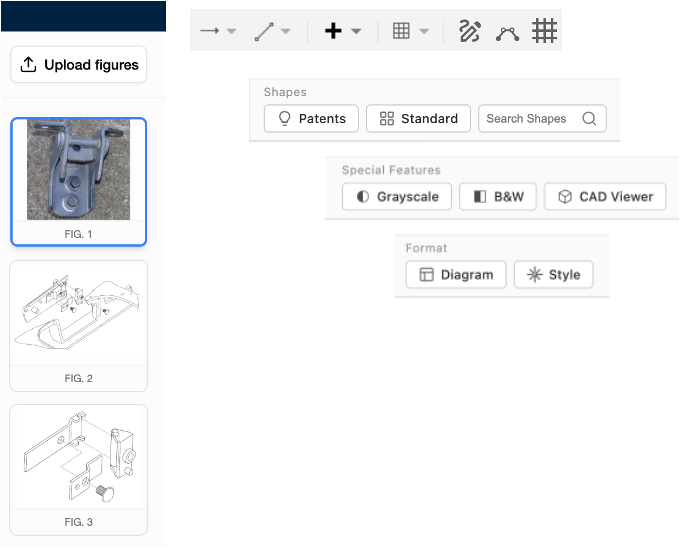
Edits using the AI Chat are easy. For example, a simple natural language prompt can be used to convert a photo to a line drawing.

Adding element labels and lead lines is also straightforward and can be done via the AI Chat. Doing so automatically adds the reference numerals and element labels to a master list which can be edited to propagate updates across the application documents and figures.

Figures can be exported individually directly from Figure Builder or as a set for filing from the document editor itself. Before doing so though you should verify that the figures, especially those which have been generated or edited with AI, are accurate and show the features that you need them to. Figure Builder reduces the reconciliation work that ensures consistency is maintained, but the attorney remains responsible for the final figure set.
Reference numeral errors are not a result of carelessness, but of fragmented workflows. When the figures, list of reference numerals and application text are edited independently, catching errors relies entirely on an individual noticing inconsistencies as they arise.
Figure Builder collapses these independent sources into one single master registry that the figures and application text are linked to:
The result is an application where reference numerals and element labels are used consistently. For the attorney, this avoids breaking their drafting flow to independently update the figures, list of reference numerals and application text every time a change is made, however minor it might be. And more focussed attorney time means higher quality applications across the board.
Solve's Figure Builder can also bring in any figures you may already have prepared elsewhere, and seamlessly integrate them into your drafting. When you upload a figure as a PDF, an image, a Visio file, or one embedded in a Word or PowerPoint document, Solve does more than store it. When you upload an already prepared figure, it is read and interpreted within the context of your invention disclosure and application. A title and description are suggested, and any existing reference numerals are detected and added to the project-wide list of element labels and reference numerals. You review these before they are committed, and from that point the figure and its labels are part of your application, kept consistent with the claims, description and abstract just like figures created within Solve.
Although the USPTO does not impose the same formal drawing requirements for provisionals as it does for non-provisionals, reference numerals, element labels and figure descriptions introduced in provisionals can create issues down the line if not properly thought through. Consistency between a provisional and non-provisional claiming priority from it matters. Inconsistency can create unnecessary amendment work and can raise written description and clarity questions.
When you draft applications using Solve with its integrated Figure Builder, the transition from provisional to non-provisional becomes a refinement exercise. The single master registry created when drafting the provisional can be carried forwards to the non-provisional, along with the figures and application text, so changes can be made without risking consistency.
Pre-filing figures carry the same data risk as any other unpublished content. At Solve Intelligence, we adhere to the highest security standards. We are ISO 27001 and SOC 2 Type II certified, with formalised policies around data handling, access controls, and auditability. We also comply with ISO 42001 for AI management systems, as well as GDPR and CCPA.
Additionally, we implement Zero Data Retention (ZDR) policies with our model providers, meaning client data processed through Solve's platform is not retained or used to train any of the underlying models. You can use Solve’s platform and integrated Figure Builder confident in the knowledge that your data is being handled securely.
Interested in seeing Solve Intelligence in action? Reach out to us directly or book a demo at solveintelligence.com.
Figure Builder is Solve’s integrated workspace for creating and editing patent drawings. It combines an AI Chat, a canvas for editing your figures, and a project-wide master element label registry. Solve’s Figure Builder allows you to create, upload, edit, refine and label figures in the same environment as your application text.
Figure Builder accepts all sorts of image formats, including images embedded in Word or PowerPoint documents, as well as 3D CAD files. Figures can also be built from scratch using words alone, e.g., the wording of an independent claim.
The project-wide master element label registry stores all of your element labels and reference numerals. Applying them to your drawings can be done by the AI or manually. Updates are propagated throughout the master registry, figures and application text.
Figure Builder helps you produce consistent, well-labelled drawings but does not automatically guarantee compliance with formal drawings rules. Attorneys should still verify line weights, font size, margins, legibility and numbering conventions against applicable law.
The master element label registry is central to maintaining consistency across your figures and application text. It ensures that every component carries the same numeral across every figure and part of the application.
No, provisional applications do not need formal patent figures in the same way that non-provisional applications do. But reference numerals and figure descriptions introduced in a provisional often carry forward into the non-provisional. Inconsistencies between the two can create avoidable amendment work at the priority transition.
Tools like Patently Create enable you to prepare figures in a dedicated drawing environment, but such figures then need to be exported from a drawing platform before being imported to a drafting platform. Figure Builder is different: your figures, element labels and application text all live in the same project on the same integrated platform.
Yes. Solve treats all client data with the utmost security. Your data is encrypted in transit and at rest, and is sandboxed per user. Sharing data within Solve is possible, but requires an active step on the part of the user wanting to share data. Nothing is shared unless you choose to share it.


.webp)